
5 Most Frequently Asked Questions
1. Payment : How much is the ANYSUPPORT SaaS plan, for 1 agent account?
Based on 1-year upfront payment, AnySupport plans are (tax not included)
1,000,000 Won for the Basic Plan, 1,200,000 Won for the Pro Plan, 1,400,000 Won for the Premium Plan, 3,000,000 Won for the Premium + Mobile Plan,
and no contract plans are available as well. For more info, visit our Pricing and Plans page.
2. Function : Can one agent support multiple customers at the same time?
Yes, one agent can support multiple customers and remote sessions, up to 10 sessions per agent.
3. Service Start : Can we try the service for free before purchasing a plan?
Yes. You can try out the full version of the service, free for 15 days by clicking on Free Trial on our website.
4. Function : Do you support customers who are abroad?
Yes, regardless of your physical location, remote support is available if you have internet.
5. Service Start : Are there additional fees after purchasing a plan?
No, there are no additional fees.
Q. What is ANYSUPPORT?
It's a service that enables remote support while sharing customer's PC screen, whenever and wherever internet is available.
Because the customer's screen is shared and remote control is performed through mouse and keyboard, problems can be resolved more quickly.
Because the customer's screen is shared and remote control is performed through mouse and keyboard, problems can be resolved more quickly.
Q. We (company providing support) just purchased AnySupport. How can we provide support to our customers?
You can use our service the moment you complete your purchase.
Furthermore, your company can provide customer support via a customized, private URL(988.co.kr/Company ID,
or through our public URL(https://988.co.kr), and the
agent program can be downloaded from our website.
Furthermore, your company can provide customer support via a customized, private URL(988.co.kr/Company ID,
or through our public URL(https://988.co.kr), and the
agent program can be downloaded from our website.
Q. How can we (customers being supported) receive help?
As stated above, you can receive remote support by accessing public/private URL.
Web-based remote sessions are supported not only on Explorer, but other browsers, and AnySupport provides access method via program installer (.exe file) for those who don't use ActiveX.
Web-based remote sessions are supported not only on Explorer, but other browsers, and AnySupport provides access method via program installer (.exe file) for those who don't use ActiveX.
Q. What are the system requirements to use remote support service?
System Requirements for AGENT
Windows® 2000, Windows® XP, Server 2003, Vista, Window 7, Windows 8 and later
Internet Explorer®, Netscape Navigator ® 4.0 later, Mozilla FireFox® 1.0 later,
Google Chrome® 4.0 and later, Opera® 10.0, Safari ™ 1.3 later
System Requirements for CUSTOMER
Windows® 2000, Windows® XP, Server 2003, Vista, Window 7, Windows 8 and later
Internet Explorer®, Netscape Navigator ® 4.0 later, Mozilla FireFox® 1.0 later,
Google Chrome® 4.0 and later, Opera® 10.0, Safari ™ 1.3 later
Windows® 2000, Windows® XP, Server 2003, Vista, Window 7, Windows 8 and later
Internet Explorer®, Netscape Navigator ® 4.0 later, Mozilla FireFox® 1.0 later,
Google Chrome® 4.0 and later, Opera® 10.0, Safari ™ 1.3 later
System Requirements for CUSTOMER
Windows® 2000, Windows® XP, Server 2003, Vista, Window 7, Windows 8 and later
Internet Explorer®, Netscape Navigator ® 4.0 later, Mozilla FireFox® 1.0 later,
Google Chrome® 4.0 and later, Opera® 10.0, Safari ™ 1.3 later
Q. Is there anything additional our customers should prepare to receive remote support?
No. The customer just needs to enter in the verification code given by the agent.
Q. Do our customers need to pay an additional fee to receive remote support?
No, there are no additional fees.
Q. Can we try the service for free before purchasing a plan?
Yes. You can try out the full version of the service, free for 15 days by clicking on Free Trial on our website.
Q. My customer is using a virtual or floating IP address. Is remote support allowed on either environment?
Yes. AnySupport utilizes a relay server to connect customers with their agents, enabling remote support at anytime, regardless of the network environment.
Q. Can another agent offer support during a remote support session with a different agent?
Yes, you can use the invite another agent function to receive support from another agent even after starting the session.
Q. Besides file transfer, can I simply copy a file?
We support the common Windows functions like copy-and-paste and drag-and-drop so you can easily transfer files with just your mouse.
Q. If the customer is restarting the computer, can the agent reconnect?
Yes, use the reboot and reconnect function for the customer to automatically reconnect to the same agent after rebooting.
Q. Can we share only a specific part of the customer's screen?
Yes, choose to share not only in full screen, but partial screen or a specific application.
Q. Can the customer use the drawing function on their screen?
We support the drawing function on both ends so feel free to use it on either end.
Q. Can customers using dual monitors be supported?
Yes, we support dual monitors.
Q. What is the difference between driver mode and GDI mode?
Driver mode ensures high speed by minimizing and optimizing unnecessary data transfer during remote support
while GDI mode offers a more secure connection. The user has the freedom to choose between the two options.
while GDI mode offers a more secure connection. The user has the freedom to choose between the two options.
Q. Can the customer being remotely supported choose to stop screen sharing or the session altogether?
Yes, the customer can choose to pause or stop the session via the icon menu on the taskbar.
Q. Can I change the customer's PC screen size?
Yes. Customer's screen size can be adjusted by changing the zoom level to 50%, 75%, 100%, or full screen mode.
Q. Can the agent's screen be shared?
Yes, the agent screen share function can be used to perform remote control by the customer.
Q. Can I record the customer's screen during remote session?
All remote sessions can be recorded in real-time. Also, screenshot function can be used to save certain screen as an image file.
Q. Can one agent support multiple customers at the same time?
Yes, one agent can support multiple customers and remote sessions, up to 10 sessions per agent.
Q. What is remote printing used for?
Remote printing is a function that sends a file from either the customer or agent's end to the customer's printer without using file transfer.
Q. What is the automatically change resolution option?
If the customer and agent's display resolutions are different, this setting will automatically adjust the customer's display to the agent's display resolution settings.
Q. What is the favorites function used for?
This function is useful if you need to open a specific folder or website frequently during remote support. Registering frequently visited pages or folders will reduce support time.
Q. Do you support customers who are abroad?
Yes, regardless of your physical location, remote support is available if you have internet.
Q. Is my device prone to hacking during remote session?
Remote support is safe from hacking since it captures the screen without data transfer and compresses it in real time.
In addition, 256-bit encryption algorithm and end-to-end security with SSL is used to transfer data safely and ensure user privacy.
Also, the authentication number used by the customer is a one-time password and the installed remote support module will automatically be deleted when the session is over.
Also, the authentication number used by the customer is a one-time password and the installed remote support module will automatically be deleted when the session is over.
Q. Will my device be prone to virus during remote support?
No. However, when using file transfer, there is a risk of virus if the file being sent is already has virus.
Q. How much is the ANYSUPPORT SaaS plan, for 1 agent account?
Based on 1-year upfront payment, AnySupport plans are (tax not included)
1,000,000 Won for the Basic Plan, 1,200,000 Won for the Pro Plan, 1,400,000 Won for the Premium Plan, 3,000,000 Won for the Premium + Mobile Plan,
and no contract plans are available as well. For more info, visit our Pricing and Plans page.
Q. I can't perform remote control (or my screen is black) on macOS 10.14 (Mojave) or macOS 10.15 (Catalina).
After running AnySupportHost on macOS 10.14 (mojave), allow remote control on the "Security and Privacy"
> "Accessibility" tab (if you don't allow this, remote control cannot be performed during remote session).
1. If it's the first time running the AnySupport app, a pop up message will appear like below.
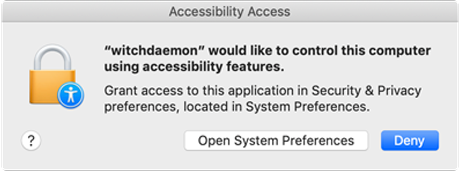
2. Click on the "Open System Preferences" button to open the "Security and Privacy" window.
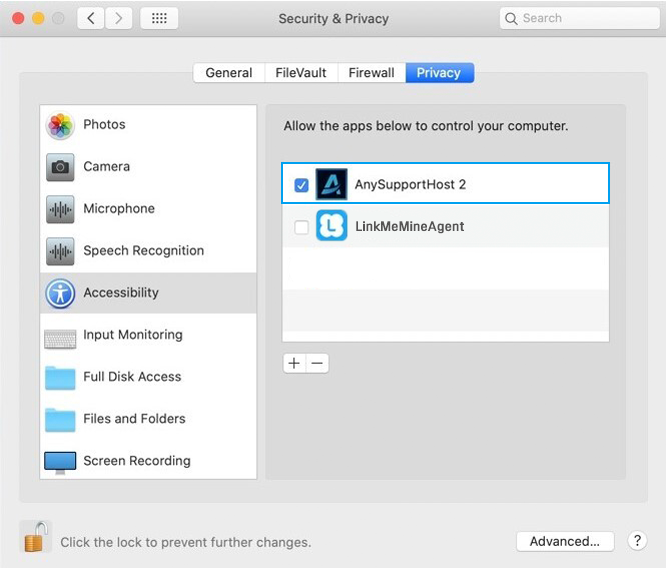
3. On the "Privacy" > "Accessibility" tab, select AnySupportHost.
After selecting this option one time, it will automatically be applied the next time you run the app.
*If the AnySupport app is updated, you need to terminate the permission by following the instructions below and repeat steps 1-3 above.
How to Terminate Remote Control Permission
1. Click on the "System Preferences" > "Security and Privacy" menu.
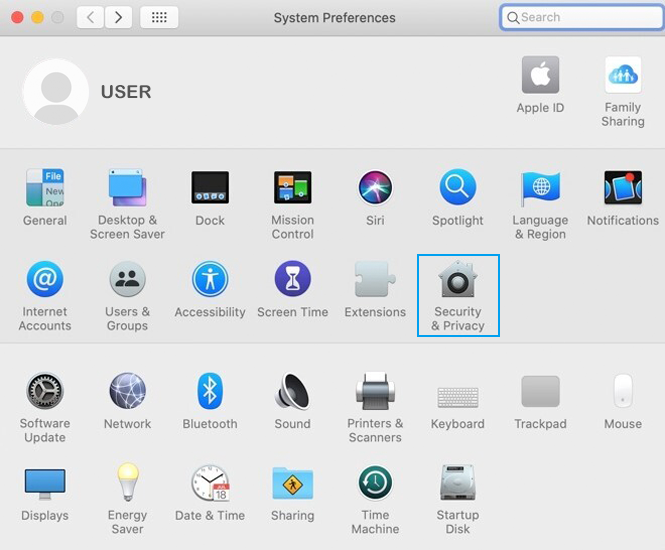
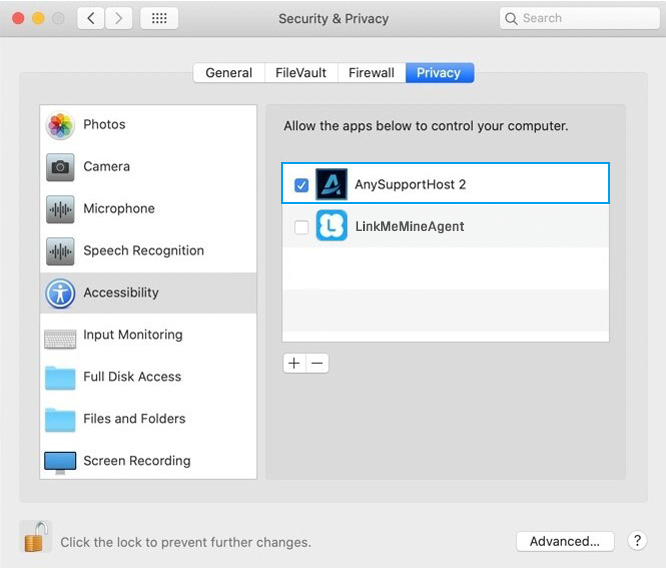
2. On the "Privacy" > "Accessibility" tab, select AnySupportHost and delete by clicking the '-' button.
1. If it's the first time running the AnySupport app, a pop up message will appear like below.
2. Click on the "Open System Preferences" button to open the "Security and Privacy" window.
3. On the "Privacy" > "Accessibility" tab, select AnySupportHost.
After selecting this option one time, it will automatically be applied the next time you run the app.
*If the AnySupport app is updated, you need to terminate the permission by following the instructions below and repeat steps 1-3 above.
How to Terminate Remote Control Permission
1. Click on the "System Preferences" > "Security and Privacy" menu.
2. On the "Privacy" > "Accessibility" tab, select AnySupportHost and delete by clicking the '-' button.